
Users
A user is someone who signs in to run your organisation - you and your staff. Users are not your customers: the people who book with you are clients, and they never appear here.
Adding a user
Section titled “Adding a user”Users are on the Security menu, not in Settings → General. Open Security → Users and add a new one. The form is in three columns:
| Field | Notes |
|---|---|
| Username | What they sign in with |
| First Name, Surname | |
| Where the invitation is sent | |
| Primary / Secondary Phone | |
| Notes | Free text |
| Address | Middle column |
| Photo/Image Upload | Right column, optional |
| Role assigned to this user | Middle column - see below |
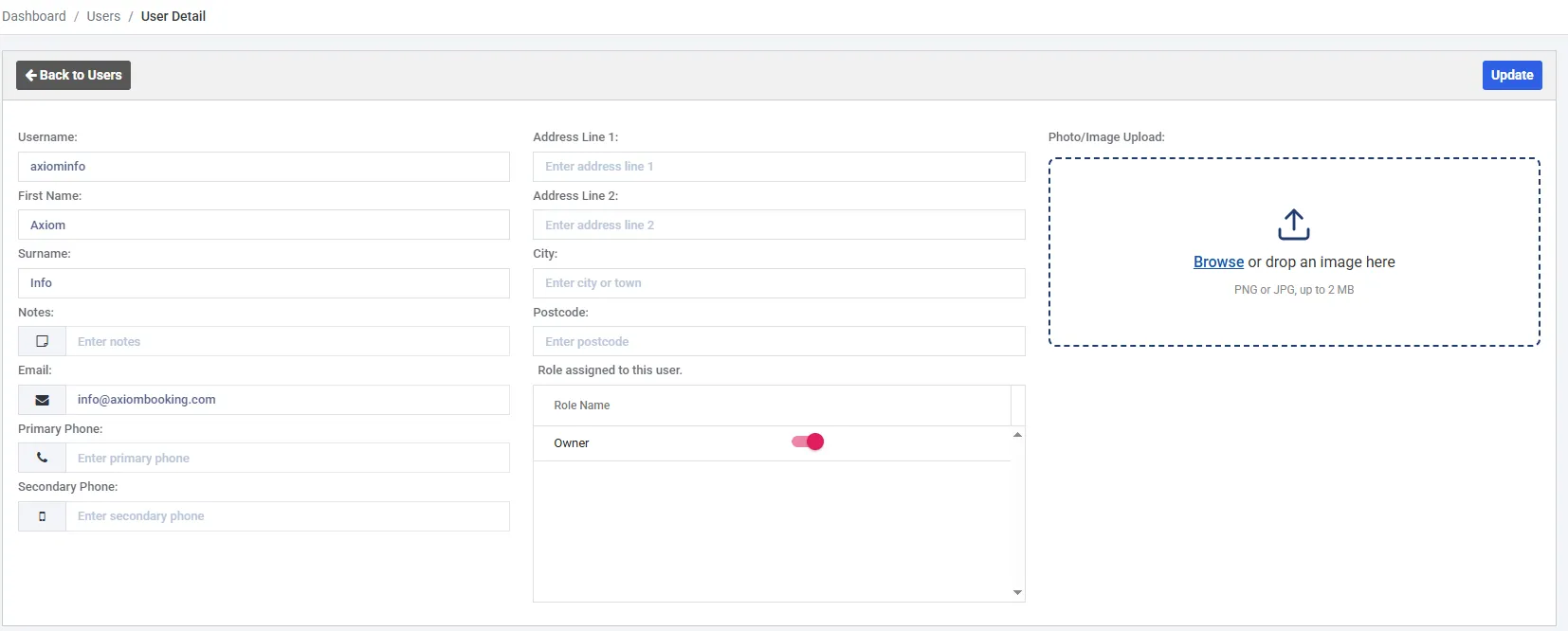
A brand-new account has one user in one role. The role grid lists every role you have created, each with its own switch.
At least one role is required
Section titled “At least one role is required”The save button stays disabled until you switch on at least one role, and the role grid is outlined in red until you do. A user with no role would be able to sign in and see nothing, so Axiom refuses to create one.
Roles are switched on and off in the grid rather than picked from a list, and a user can hold more than one. What each role actually permits is covered in roles and permissions.
What happens when you save
Section titled “What happens when you save”Saving sends the new user an email invitation. They are not active yet - nothing is live until they accept it and sign in for the first time.
The list carries two separate status columns, and reading them together is what tells you where an invitation has got to:
| Column | Meaning |
|---|---|
| Status | Whether the user is Active - that is, whether they can sign in |
| Invite Status | Whether the invitation is Complete or still Pending |

If an invitation is never accepted, the user simply stays pending. Chase the email rather than adding them a second time - a duplicate account will not help, and the username has already been taken.
Editing and removing
Section titled “Editing and removing”Open any user from the list to change their details or their roles.
One restriction worth knowing about: if a user is the last active member of the Owner role, their Owner switch is disabled. Axiom will not let the last administrator be removed from the role that administers the account - put somebody else in Owner first, then take them out. See the Owner role.