Open bookings
An open booking is one your customers can join themselves through your booking portal, rather than one you make on their behalf.
It is a checkbox on the booking panel, labelled Open Booking - allow portal clients to join. It only appears if you have the portal switched on for that module.
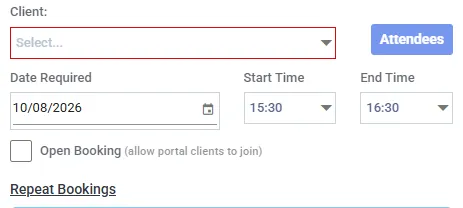
One checkbox, and it changes who the booking is for. Leave it off for an ordinary booking made on behalf of a single customer.
What it is for
Section titled “What it is for”An ordinary booking is sold whole, to one customer: somebody hires the hall. An open booking is sold by the place: a yoga class, a public workshop, a drop-in session, where you do not know in advance who is coming.
Only your staff can create one. A portal customer can join an open booking; they can never make one. That is the deliberate control point - nothing a customer does can publish your diary.
Joining is not the same in the two modules
Section titled “Joining is not the same in the two modules”| Space booking | Session booking | |
|---|---|---|
| Cost to the joiner | Free | Priced - they buy a place |
| Invoice | None | One raised to that joiner |
| Payment | None | Card at the point of joining, if you have card payments on |
Space joins are free, on every route. Only the client on a space booking is ever billed, and joining does not change that. If you need to charge each person, that is a session booking.
What a session joiner sees
Section titled “What a session joiner sees”Three outcomes, depending on your setup:
| Your setup | What happens |
|---|---|
| Card payments on, place is chargeable | They pay by card there and then. The invoice is raised and marked paid |
| Card payments off, place is chargeable | The invoice is raised unpaid. You collect it however you normally do - cash, cheque, transfer |
| Not chargeable | No invoice at all |
Having card payments switched off does not mean the place is free. The money is still owed and still invoiced - you are just collecting it yourself.
What your customers see
Section titled “What your customers see”- The booking appears in your portal for people to join
- Remaining places are shown - “3 of 10 places taken”
- A full booking is marked (Full) and cannot be joined
- A booking whose type requires approval cannot be joined at all
Attendees on an open booking are the public
Section titled “Attendees on an open booking are the public”They joined on their own. They are customers of yours, but they are not filed as belonging to any of your other clients, and they never will be - buying a place in a class does not make somebody part of the host’s organisation.
Two things follow:
- The usual restriction on who can be added to whose booking does not apply to an open booking. There is no roster to check against
- The booking panel only shows the attendees of the date you opened. On an open series, the other dates may carry people who joined and paid for that specific date, and this screen cannot show you who
That second point is the one to hold on to when changing anything. See editing and cancelling.
When somebody leaves
Section titled “When somebody leaves”Leaving removes the attendee from the booking and, if they had paid, raises a credit note against their invoice.
Somebody who has left can join again later, and is invoiced again correctly.
Editing or cancelling an open booking
Section titled “Editing or cancelling an open booking”The warnings here matter more than on an ordinary booking, because there are strangers’ money and strangers’ plans attached to dates you cannot see from the panel.
- Editing dates beyond the one you opened may change a session somebody has already paid to attend
- Cancelling those dates removes portal customers from them
Axiom tells you when a change reaches beyond the date in front of you. It cannot tell you who is on those dates from that screen - use View on the right-click menu, which shows the whole series with an attendee count per date.