
Roles and permissions
A role is a named set of permissions. Every user holds at least one, and what they can see and do is the sum of the roles they hold.
Roles are worth setting up once, properly. Reception staff who should take bookings but never issue a refund, a treasurer who needs invoices and nothing else, a caretaker who only needs the calendar - each is a role, and each is created once and assigned to as many people as you like.
Creating a role
Section titled “Creating a role”Roles are on the Security menu, alongside Users. Open Security → Roles and add one. The left of the form is the role itself:
- Role Name
- Notes
- Users assigned to this role - the same switch grid as on the user form, so you can build a role and populate it in one go, or come back later
The right of the form is the permission matrix.
The permission matrix
Section titled “The permission matrix”A tree of every page in Axiom, with four columns:
| Column | What it grants |
|---|---|
| Add | Creating new records |
| Delete | Removing them |
| Edit | Changing existing ones |
| View | Seeing the page at all |
View is the one that matters most. Without it the page is not reachable, so the other three have nothing to act on.
Child pages follow their parent
Section titled “Child pages follow their parent”Pages are nested, and a child’s checkbox is disabled until the same permission is granted on its parent. Granting Edit on a child page needs Edit on the parent first.
This is why a permission sometimes refuses to tick: the box is not broken, its parent is unticked. Work down the tree rather than up.
Some boxes are deliberately missing
Section titled “Some boxes are deliberately missing”Not every page supports all four actions, so a few cells are blank rather than unticked:
| Page | Missing | Why |
|---|---|---|
| General | Add | There is one set of organisation settings - nothing to add |
| Invoicing | Add, Delete | Invoices are raised by bookings and cancelled by credit notes, never created or deleted by hand - see invoices |
| Payment | Edit | A recorded payment is not edited. Correct it with a refund or a credit note - see recording payments |
A blank cell is a permission that does not exist, not one you have failed to grant.
The Owner role
Section titled “The Owner role”Every account is created with one role already in it, called Owner. It is the role that administers the account, and it is the guaranteed route back if permissions are ever set up wrongly - so Axiom protects it in four ways:
| Its permissions cannot be changed | The matrix is read-only on an Owner role |
|---|---|
| It cannot be deleted | |
| It cannot be deactivated | Which would amount to the same thing |
| It must always have at least one active member | The last member’s switch is disabled, on both the role form and the user form |
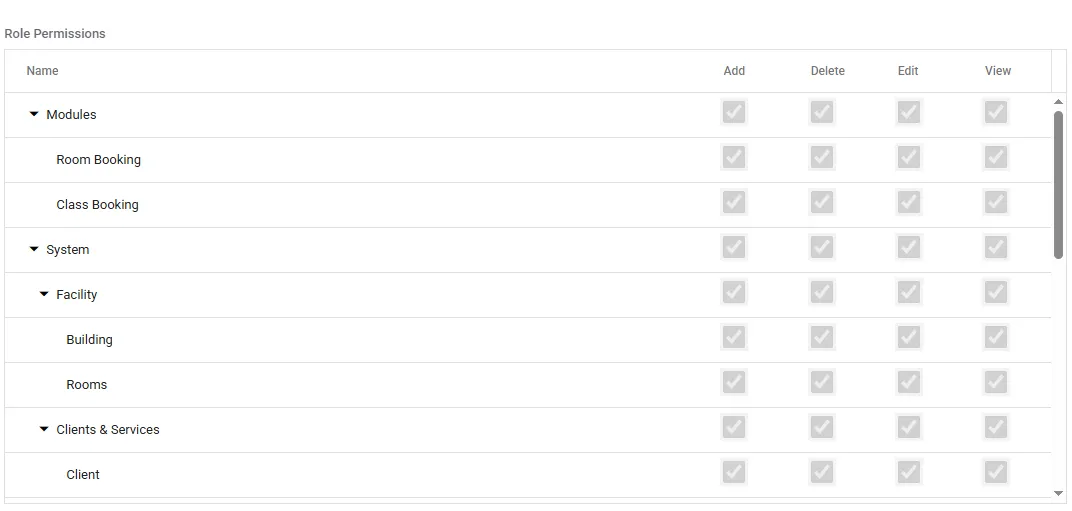
Owner’s matrix, so every box is ticked and greyed - the grey is the read-only state, not a permission you are missing. On a role you created yourself these are live checkboxes.
What you can change is its name, its notes, and who is in it - as long as one active member is left behind. Renaming it to match your own vocabulary is fine; it stays the Owner role underneath.
So if Owner is not quite the shape you want, build your own role beside it rather than trying to bend it. Give people the new role, and take them out of Owner once at least one other person still holds it.