
Setting up your organisation
The first time you sign in you’ll see Welcome to Axiom Booking and a short form. This sets up your organisation, and you can’t skip it - but everything on it can be changed later under Settings → General.
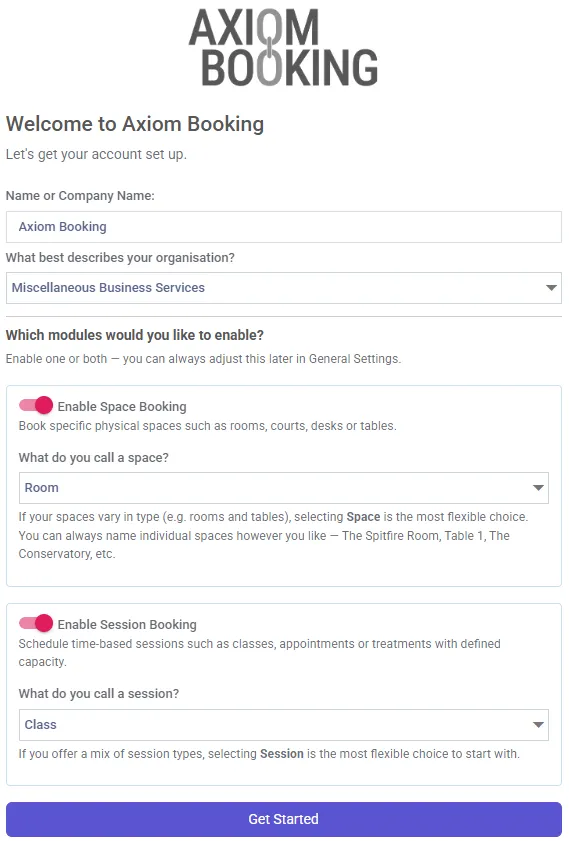
The setup form with both modules enabled, and “Room” and “Class” chosen as the wording. No timezone field is shown here because it was detected automatically.
Your details
Section titled “Your details”Name or Company Name - how your organisation is identified throughout the app. If you trade under a business name, use that.
Timezone - you most likely won’t see this. It’s detected automatically, and the field only appears if that detection fails. If it does appear, set it carefully: every booking time in your account is interpreted against it.
What best describes your organisation? - pick the closest match. It doesn’t restrict anything you can do; it helps us understand who’s using Axiom.
Which modules to enable
Section titled “Which modules to enable”This is the decision that shapes the rest of your setup. Enable one or both.
| Module | Use it for |
|---|---|
| Space Booking | Booking specific physical places - rooms, courts, desks, tables |
| Session Booking | Time-based sessions with a capacity - classes, appointments, treatments |
A village hall renting rooms wants Space Booking. A yoga studio running classes wants Session Booking. A sports centre with courts to hire and coaching sessions to fill wants both.
If you’re unsure, enable both. Neither costs anything on its own - you’re only billed for the spaces and session providers you actually create - and turning one off later is a single switch in Settings → General.
Choosing your words
Section titled “Choosing your words”Under each module you’re asked what you call things.
What do you call a space? and What do you call a session? Whatever you pick is used throughout your app - menus, buttons, form labels, the lot. Choose “Court” and you’ll be adding Courts, not Spaces.
If your spaces vary in type - rooms and tables, say - “Space” is the most flexible choice. You can still name each one individually however you like: The Spitfire Room, Table 1, The Conservatory. The same applies to sessions: if you offer a mix, “Session” is the safest starting point.
Finishing
Section titled “Finishing”Choose Get Started. Your organisation is provisioned and you land on the dashboard.
Yours will be empty to begin with - it fills as you add spaces and take bookings.
From here, go to whichever applies:
- Space Booking → Adding your first space
- Session Booking → Adding session providers