Email settings
Settings → General → Email controls the mail Axiom sends on your behalf, automatically, when a booking is made, cancelled or changed.
The four switches
Section titled “The four switches”Each is independent. Turn off the ones you do not want.
| Switch | Sent when |
|---|---|
| Send booking confirmation emails | A booking is made |
| Send booking cancellation emails | A booking is cancelled |
| Send booking change emails | A booking moves date, time or space |
| Send session provider notification emails | A provider’s sessions are booked, cancelled or changed |
The first three go to your customer. The fourth goes to the session provider - they are told separately about their own sessions, because they are running them rather than buying them.
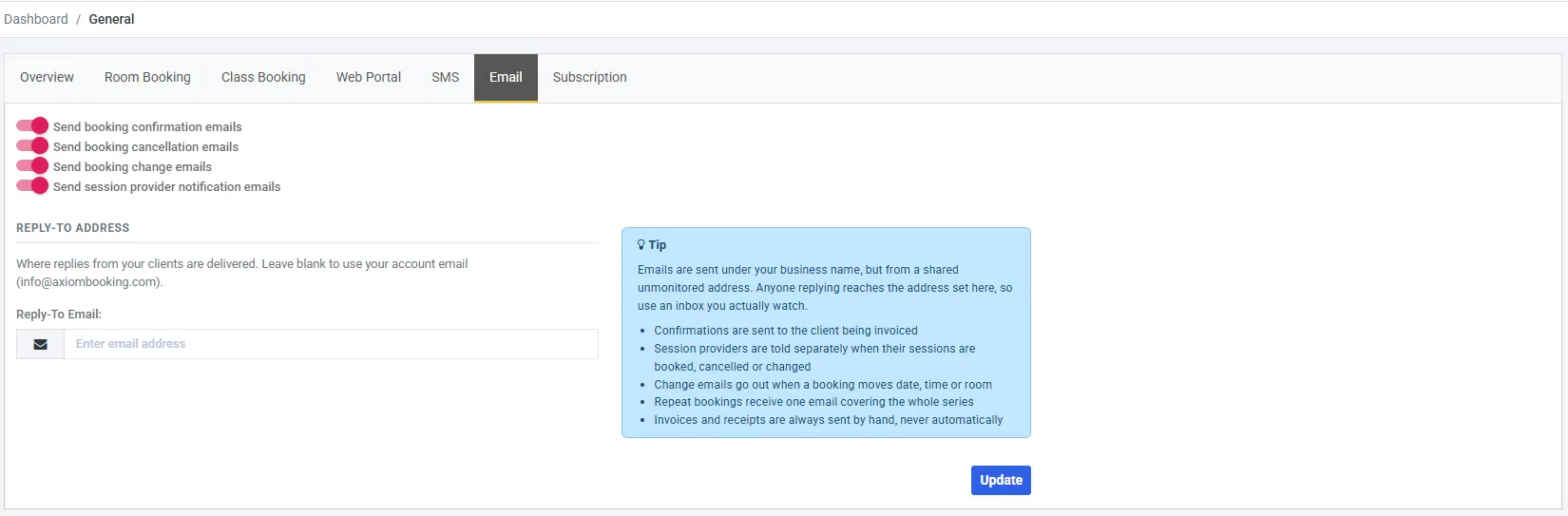
All four on, and Reply-To left blank - so replies go to the account email named in the line above the field.
Who the confirmation goes to
Section titled “Who the confirmation goes to”The client being invoiced - which is not the same person for the two modules:
| Who gets the confirmation | |
|---|---|
| Space booking | The client on the booking. One email |
| Session booking | Every attendee, individually |
That follows the billing direction rather than the booking screen, so a class of six sends six confirmations and a hall hire with six guests sends one. Invoicing & Payments explains why.
Reply-To address
Section titled “Reply-To address”Axiom’s mail goes out under your business name, but from a shared unmonitored address. Nobody reads replies sent to it.
The Reply-To Email is where a customer’s reply actually lands. Leave it blank and your account email is used. Either way, make it an inbox somebody watches - a customer answering a booking confirmation expects to reach you.
What is never sent automatically
Section titled “What is never sent automatically”Update saves the tab.