
Repeating a booking
Any booking can become a series. The Repeat Bookings section sits at the foot of the booking panel, and every date it would create is listed before you commit.
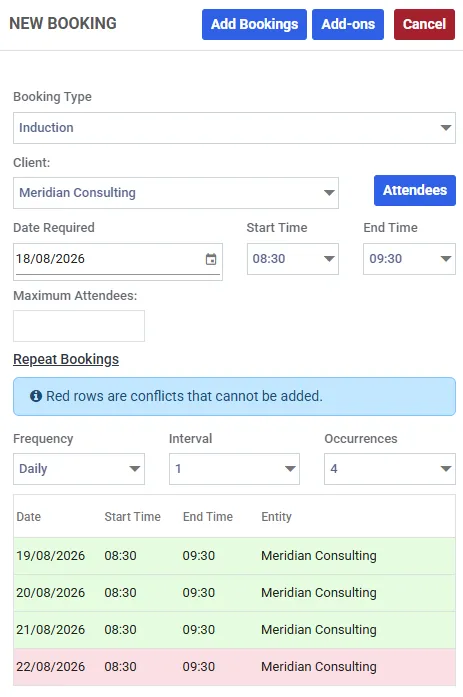
Four occurrences asked for, three that can be created. The red row is a clash and will be skipped - this list is the only place that tells you.
The three fields
Section titled “The three fields”| Field | What it means |
|---|---|
| Frequency | Daily, Weekly, Monthly or Yearly |
| Interval | How many of those to skip between dates. Weekly with an interval of 2 is fortnightly |
| Occurrences | How many dates to generate, up to 52 |
Set all three and the grid below fills in with the dates, times and space - or provider - for each one.
Read the list before you save
Section titled “Read the list before you save”The preview is not a formality. Axiom will not create a booking that clashes with something already in the diary, so it silently produces fewer bookings than you asked for and the list is the only place that says so.
- Red rows are conflicts. They will not be added. Something is already booked in that space at that time, buffers included
- Dates with no slot are dropped entirely. If the space or provider has no availability window covering that date, the occurrence cannot be placed and does not appear
- If every date fails, the save is refused rather than creating an empty series
So a weekly series of twelve across a period you are already partly booked may quietly produce nine. Count the green rows.
Clock changes
Section titled “Clock changes”Recurrence steps in your local time, not in UTC, which is the behaviour you want: a 09:00 class stays at 09:00 all year rather than drifting to 08:00 when the clocks go back.
Two consequences at the boundaries:
- When the clocks go forward, the missing hour does not exist. An occurrence that lands in it is skipped, not moved - every other date keeps its original time. A ten-week series straddling that weekend produces nine
- When the clocks go back, that hour happens twice. Axiom takes the first one
You do not need to do anything about either. It is worth knowing because it is the one case where a date goes missing and nothing is wrong.
What a series carries - and what it does not
Section titled “What a series carries - and what it does not”This is the part that catches people out.
Attendees and add-ons do not repeat by default. Both panels have a Recur column, and both arrive unticked. An attendee or an add-on you add is attached to the date in front of you and no other unless you tick it.
That is the right default for a one-off - a guest who comes once, a projector hired for the first session only. It is the wrong default for a weekly class with the same twelve people every week, so it is worth a deliberate look before you save.
A series is a scheduling idea, not a billing one
Section titled “A series is a scheduling idea, not a billing one”Axiom never treats “these twelve bookings are a series” as a reason to put them on one invoice.
- Ordinary bookings each raise their own invoice as they are made
- If the booking type requires approval, each date is approved separately - twelve dates means twelve approvals. That is deliberate: conflicts differ per occurrence, so you may want to approve eleven and reject the one that clashes with a closure. The customer still gets one confirmation email for the series
- A series approved either side of an invoice being issued legitimately lands on two invoices
None of that is a fault. Scheduling and billing are answering different questions.
Changing a series later
Section titled “Changing a series later”Editing or cancelling any date in a series asks how far the change should reach - this date, this and all future, or all of them.
Editing a series is a replace, not a patch: the originals are removed and a new set created, and the same conflict rules apply to the new set. Full detail in editing and cancelling.
There is no way to add a date to an existing series. To extend one, cancel it and create a longer one, or add the extra dates as separate bookings.