Control who sees what, down to the page
Fine-grained role-based permissions across every module so every team member sees exactly what they need to.
Add your entire team at no extra cost — Axiom pricing is built around your bookable capacity, not your headcount.
Create roles once, control access everywhere
Define named roles that reflect how your team actually works. Assign a staff user to a role and their access is set across every module of the main system instantly.
- Custom Role Definitions
Name roles however your organisation works: Admin, Manager, Front Desk, Finance, Read-Only. Each role is a distinct permission profile applied consistently across the whole platform.
- User-to-Role Assignment
Users are assigned to roles, not given individual permission grants. When a role changes, every user on that role updates automatically, with no hunting through individual users.
- Unlimited Users, Zero Seat Cost
Add as many team members as you need. There is no per-user pricing. Your subscription is tied to what you are managing, not how many people help you manage it.
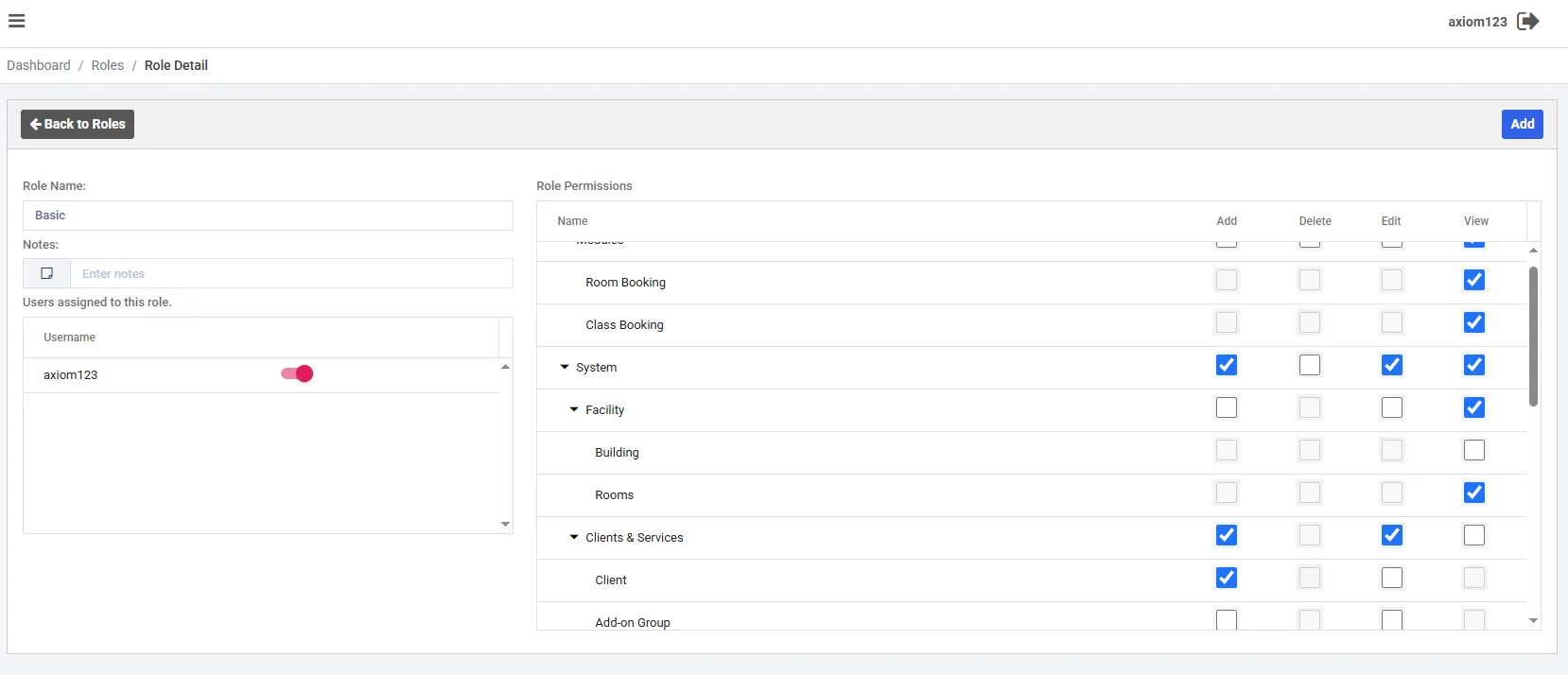
Add, Delete, Edit, View, per module and per sub-resource
Permissions are not all-or-nothing. Every module exposes four independent access flags, giving you surgical control over what each role can actually do.
| Module | Add | Delete | Edit | View |
|---|---|---|---|---|
| Modules | Allowed | Allowed | Allowed | Allowed |
| Space Scheduling | Allowed | Allowed | Allowed | Allowed |
| Session Scheduling | Allowed | Allowed | Allowed | Allowed |
| System | Allowed | Allowed | Allowed | Allowed |
| Facility | Allowed | Allowed | Allowed | Allowed |
| Building | Not allowed | Not allowed | Allowed | Allowed |
| Spaces | Allowed | Not allowed | Allowed | Allowed |
| Client & Management | Allowed | Not allowed | Allowed | Allowed |
| Clients | Allowed | Not allowed | Not allowed | Allowed |
Your platform and your data, completely private
Clients, bookings, users, and settings are never shared across organisations. You control exactly who on your team can access what.
- Private by Design
Your clients, spaces, sessions, invoices, and team settings are visible only to the people you authorise. Access is granted explicitly; it is never assumed.
- Fully Self-Managed
You own your role structure entirely. Create, adjust, or remove roles through the Security section at any time. No involvement from us required.
- Passwordless Authentication
Sign-in runs on Microsoft Entra External ID, using an email address plus a one-time passcode. There is no password to set, remember, or leak, and Axiom never stores or manages passwords because there aren't any.
Security that fits your organisation, not just a checkbox
Right access, right people
Front desk staff see bookings. Finance sees invoices. Managers see what they need. No role carries more access than the job actually requires.
Scale your team freely
No per-seat licensing means you can bring on seasonal staff, volunteers, or contractors without a billing conversation every time your team changes.
Built for real operations
Permissions mirror your actual system structure (modules, sub-modules, and individual resources), so your access model reflects how your facility actually runs.
Give your team the right access: nothing more, nothing less
Role-based security built for real operations, with no per-seat cost as your team grows.
Start free for 28 days. No card required.
Back to all features